Download Counter-Strike 1.6 Original for PC
Download Counter-Strike 1.6 on our site cs16-game.net and play the original CS 1.6 on your PC. You can get our client through a direct EXE download or as a ZIP file.
This is the classic Counter-Strike 1.6 version, with original player and weapon models, lots of maps, working server browser, strong anti-slowhack and client protection, classic GUI and game menu, latest bots for offline training included. Tested and working on all Windows versions XP/7/8/10/11. It uses Protocol 48, keeps the original gameplay and feel, and runs easily even on older PCs.
Below, you will find simple installation instructions, Windows compatibility details, system requirements, and answers to some common questions about installing and running CS 1.6.

DOWNLOAD CS 1.6 FOR FREE
DOWNLOAD FREE DOWNLOAD as ZIP (no install needed)FILE VERIFICATION
Why players choose our Counter-Strike 1.6 client?
This version is for anyone looking for a clean and safe Counter-Strike 1.6 original client with no modifications. It keeps the familiar graphics, maps, and weapon models that make the classic game recognizable, while supporting both online multiplayer and offline practice with bots.
- Classic Counter-Strike 1.6 client with over 50 maps and original player and weapon models.
- Works great on Windows XP/7/8/10/11
- Online multiplayer and LAN support.
- Play as Terrorists or Counter-Terrorists.
- Offline play with bots for practice.
- Dual Protocol 47 + 48 support for joining both types of servers.
- Working server browser with Internet, Favorites, and LAN tabs.
- Dedicated and listen server support.
- HLTV is included and works with the client.
- Metamod-P and AMX Mod X are included.
- Compatible with sXe Injected anti-cheat.
- Low system requirements and small setup size of around 180 MB.
- Portable — the game can be run without a traditional installation.
- In-game advertisements have been removed.
- Full game client protection from all vulnerabilities.
- Optimized for low ping and high fps.
How to download and install CS 1.6 (step by step)
- 1Click the Download Free button above.
- 2Run the
counter-strike.exeinstaller once the download finishes. - 3Select your installation folder (usually
C:\Games\CS16). - 4Launch the game and join a server via the "Find Servers" menu.
How to play Counter-Strike 1.6
Counter-Strike 1.6 can be played online or offline. To join a multiplayer game, open the in-game server browser, find a server with a good ping, and connect.
For offline play, start a local game and add bots. This is useful for learning maps, testing your sensitivity, practising aim, or simply playing without an internet connection.
Whether you want to join public servers or practise on your own, the client supports both options.
CS 1.6 is a team-based tactical shooter. You can join either the Terrorists or Counter-Terrorists. Use the 'B' key to buy weapons at the start of the round. The objective is either to plant/defuse the bomb or rescue hostages, depending on the map type (de_ or cs_).
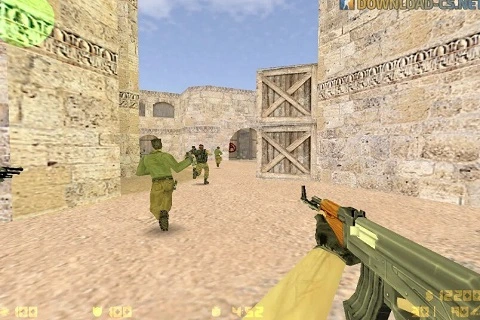
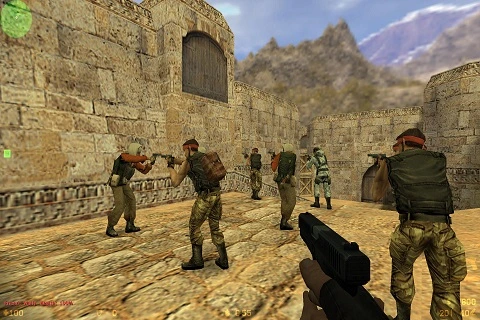
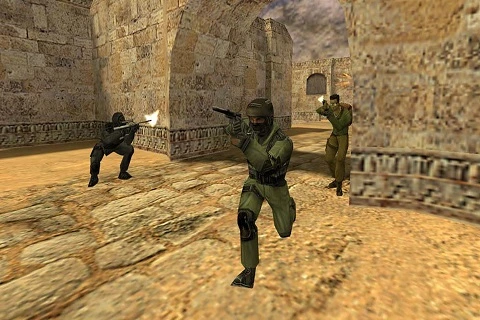
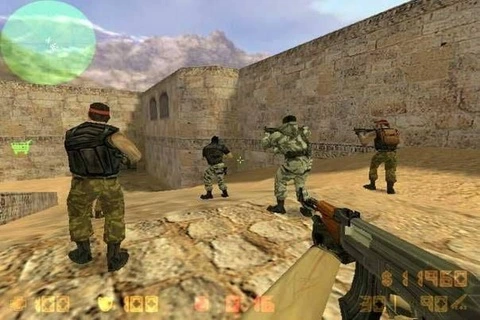
CS 1.6 Screenshots
System requirements
| CPU: | 500 MHz |
| RAM: | 96 MB |
| OS: | Windows XP/7 |
| Storage: | 700 MB |
| CPU: | 1.2 GHz+ |
| RAM: | 512 MB+ |
| OS: | Windows 10/11 |
| GPU: | 128 MB+ VRAM |
CS 1.6 FAQ
How do I download CS 1.6?
Click the direct download button to download the installer.
Can I play Counter-Strike 1.6 online?
Yes. Launch the game, open the server browser, choose a server with a suitable ping, and connect.
Can I play CS 1.6 with bots?
Yes. You can start an offline game and play against bots. It’s a good way to learn maps, warm up, or practise your aim before playing online.
Does CS 1.6 work on Windows 11?
Yes. The client is suitable for Windows 11 and Windows 10, as well as the older Windows versions listed in the system requirements.
Can CS 1.6 run on an older laptop?
Yes. CS 1.6 has very low hardware requirements, so it can run comfortably on many older laptops and desktop PCs.
How much free disk space does CS 1.6 need?
At least 700 MB of free disk space is recommended for the game files.
What build is this CS 1.6 client?
The in-game console reports build 8684. You can check the build number yourself after launching the game.
What protocol does this CS 1.6 client use?
The client uses Protocol 48. You can use this number to identify the client and check server compatibility.
Is this CS 1.6 download checked for malware?
The counter-strike.exe file has been scanned with VirusTotal, where
0 of 93 security vendors flagged it as malicious at the time
of the scan. You can open the public report and compare the SHA-256 hash with
the file before running it.